What BoasTools is
BoasTools (also written Boas Tools or BoasTool) by Glavkon is a free extension for Altium Designer. It adds tools to the PCB editor, for example for the silkscreen, and an interactive BOM. The interactive BOM is the viewer of InteractiveHtmlBom 2.3 from 2021, filled with the data of your Altium board: a BOM table with checkboxes next to a 2D drawing.
That is a good start for one board. Placemate goes further where a hand assembly needs it: the view, the board geometry, 3D, a guide through the build, several boards and polarity.
Six things Placemate does better
1. A viewer built for the bench
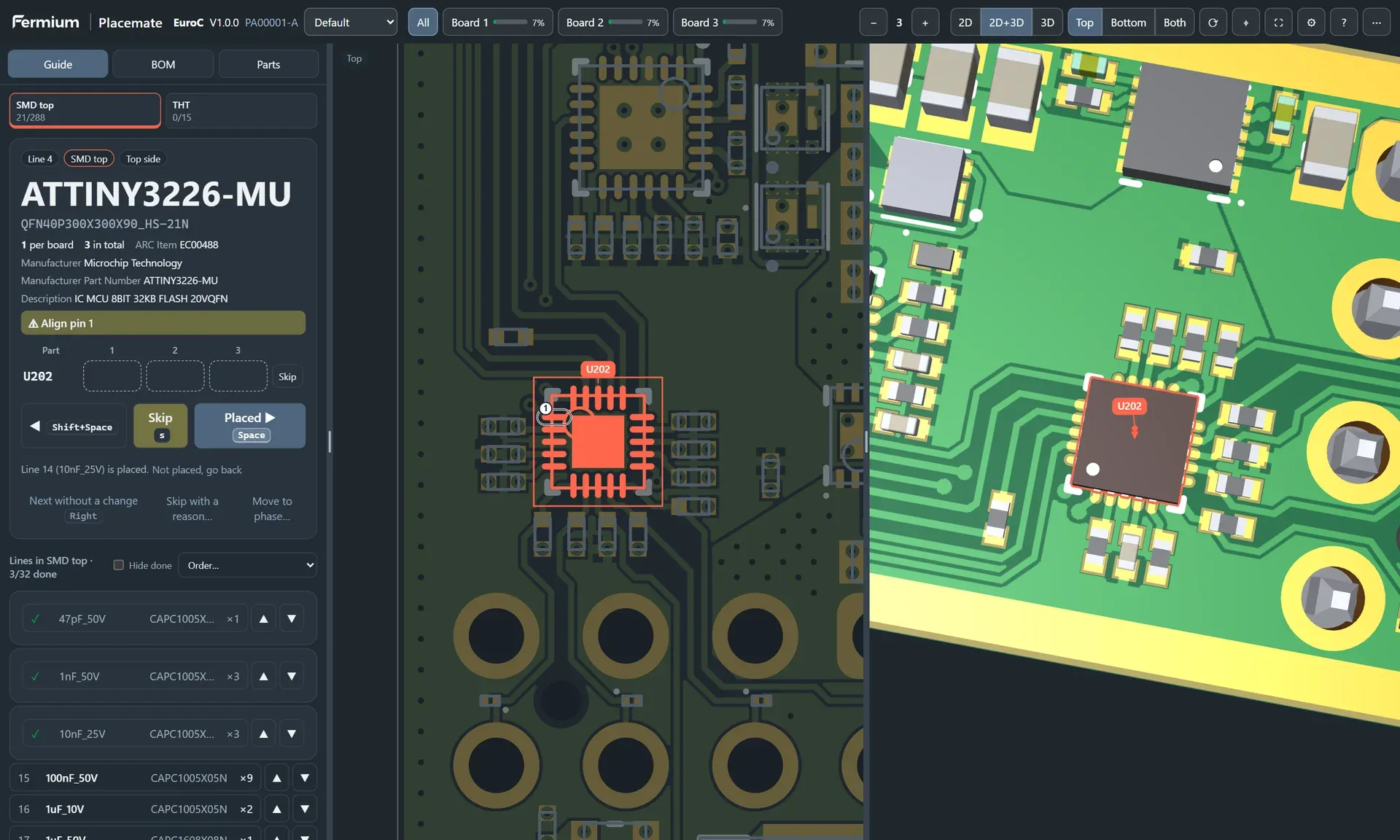
Placemate has its own viewer. It highlights all parts of the current BOM line, numbers them in a short path and zooms to them. An arrow points to each part outside the view. The other parts go dim, so the highlight stands out under a microscope lamp. Type a designator, a value or a footprint, and both views go to the part.
2. The board as Altium draws it
The iBOM viewer of BoasTools knows rectangular, round and oval pads. Placemate draws every Altium pad shape, the copper and the silkscreen with the fonts of your design. A rounded, chamfered or custom pad looks the same as in the PCB editor, so you match the drawing to the board at a glance.
3. A 3D view of the real parts
BoasTools has no 3D view. Placemate shows the board in 3D with the STEP models of your library, next to the 2D view or alone. Connectors, tall capacitors and parts under shields are easy to read. A part that hides under a taller part shows through it.
4. Guided placement, one line at a time
A BOM table leaves the order to you. Placemate guides you through the build: it shows one BOM line, you place its parts, you press Space, and the next line comes up. Sort the lines into phases (SMD top, SMD bottom, THT) and by prefix, package size or area. Press S to skip a part that is not in stock and U to undo.
5. Several boards in one build
The checkboxes of the iBOM viewer track one board. Placemate tracks 1 to 20 boards: place a line on board 1, 2 and 3, then go on. A grid shows each part on each board, and the header shows the progress of each board. Save the progress in a copy of the file or export it.
6. Polarity you can trust
BoasTools marks pin 1. Placemate marks pin 1, the cathode of diodes and LEDs and the plus pad of polarized capacitors. The marks come from the pad names and the schematic pin names, not from a guess on pad numbers, and the guide also says them in words.
Side by side
| BoasTools interactive BOM | Placemate | |
|---|---|---|
| Viewer | iBOM viewer 2.3 (2021), BOM table and 2D drawing | Own 2D and 3D viewer, zoom to the parts, numbered path, arrows to parts out of view |
| Board geometry | Rectangular, round and oval pads; text as lines | All Altium pad shapes; text in the fonts of the design |
| 3D view | No | Yes, with the STEP models of your library |
| Guided placement | No | One BOM line at a time, Space for the next line, phases and placement order |
| Several boards | No, one set of checkboxes | 1 to 20 boards, progress per board |
| Polarity marks | Pin 1 | Pin 1, cathode and plus pad, from pad and pin names |
| AD26 and Altium Develop | Not in the extension lists when we checked in October 2026 | Yes |
Keep the PCB editor tools of BoasTools if you use them. Placemate does not change your design and has no silkscreen tools. It replaces only the interactive BOM.
Switch in five minutes
- Close Altium and run the Placemate Setup program. Select AD26, Altium Develop or both.
- Open your PCB and save it.
- Select Placemate » Generate…, set the build quantity and select Generate.
- The HTML file opens in the browser. Press Space after each line.
Not sure? Try the live demo with our EuroC board, or read how Placemate compares withInteractiveHtmlBom.
Questions
I used BoasTools. Why switch to Placemate?
BoasTools exports Altium data into the iBOM viewer from 2021. Placemate has its own 2D and 3D viewer with the exact Altium pad shapes and text. It guides you one BOM line at a time on 1 to 20 boards and marks pin 1, the cathode and the plus pad. It is built for AD26 and Altium Develop.
Which Altium versions does Placemate support?
Placemate supports Altium Designer 26 (AD26) and Altium Develop on Windows 10 and Windows 11, 64-bit. The Setup program finds every Altium installation on the computer and installs the extension into the ones you select.
Does the HTML file need internet or upload my design?
No. The file contains the board, the BOM and the 3D meshes, and it makes no network requests. Your design stays on your computer and on the devices that you copy the file to.
What does "per seat" mean?
A seat is one user of the Altium extension. Buy one seat for each engineer who makes Placemate files. One seat costs $25 once and is valid for life.