What InteractiveHtmlBom does well
InteractiveHtmlBom by openscopeproject makes one self-contained HTML page from a KiCad board. The page links a searchable BOM to the board drawing, shows the silkscreen, the fab layer and the pads, and can highlight nets. It works offline, it is free under the MIT licence, and it also reads EasyEDA, Eagle, Fusion 360 and Allegro files. If you use KiCad, keep using it.
Where iBOM stops for Altium users
- No Altium support. iBOM reads none of the Altium file formats. Exporter scripts exist, but they are slow on large boards and lose the TrueType text.
- No build quantity. The checkboxes track one board. A request to track several boards was declined (issue #227).
- No placement order. You cannot sort the lines into the order of the assembly (issue #246).
- No zoom to the selected parts (issue #559). On a dense board you still search for the highlight.
- No 3D view. Tall parts, connectors and parts under shields are hard to read in 2D.
- State only in localStorage (#119, #179). Clear the browser data and the progress is gone.
From iBOM to Placemate
| In InteractiveHtmlBom | In Placemate |
|---|---|
| Export from KiCad with the plugin | Placemate » Generate… in the Altium PCB editor |
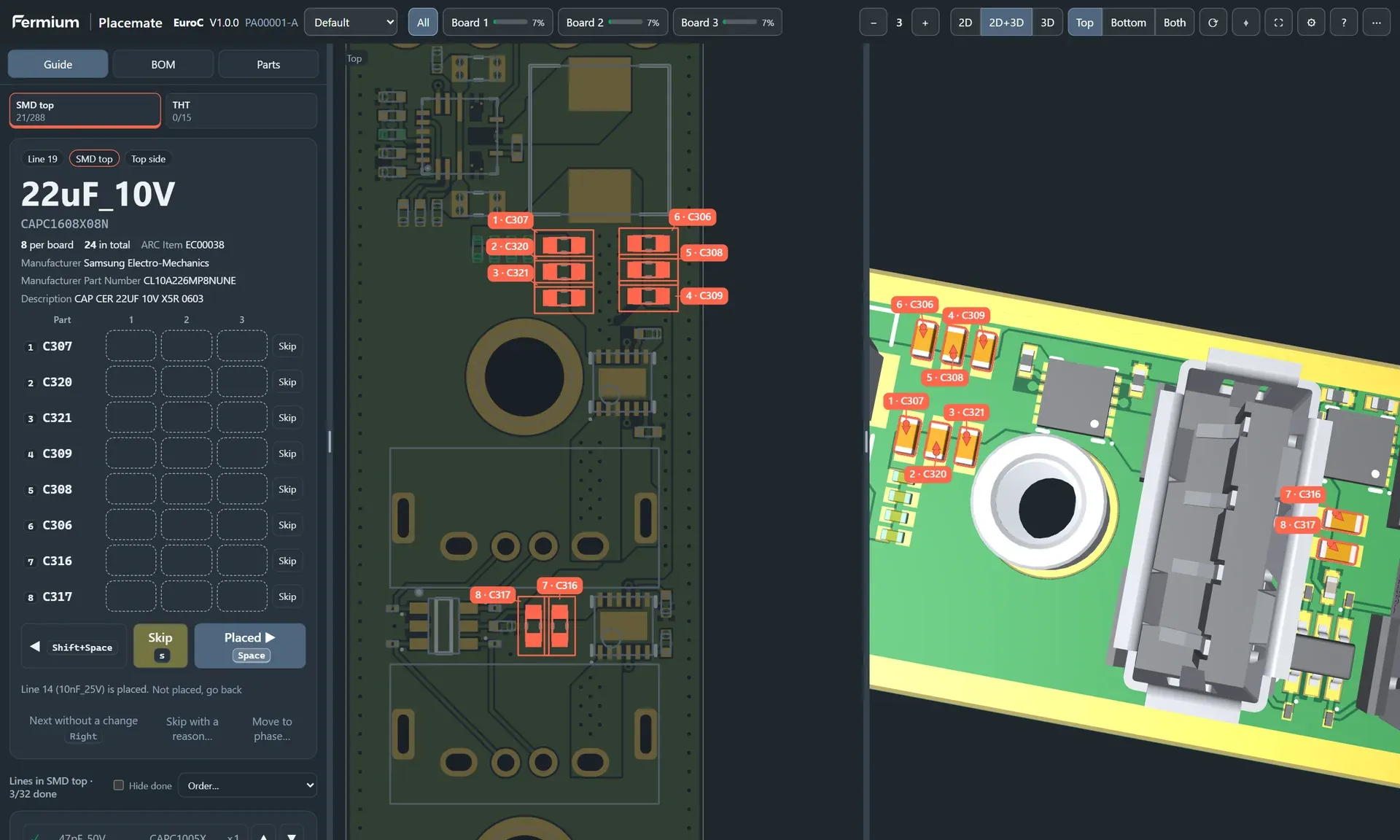
| Click a BOM row to highlight its parts | The guide shows one line at a time and highlights its parts. Space goes to the next line |
| Checkboxes for one board | A status for each part on each of 1 to 20 boards, with progress per board |
| Sort the BOM table | Phases (SMD top, SMD bottom, THT) and a placement order by prefix, package size or area |
| Highlight pin 1 | Cathode, plus pad and pin 1 from the pad and schematic pin names, in the view and in words |
| 2D board view | 2D view with exact Altium pads and text, and a 3D view with your STEP models |
| State in the browser | State in the browser, export as JSON, or a copy of the HTML file with the progress |
Who should use which
Use InteractiveHtmlBom if you design in KiCad, EasyEDA, Eagle or Fusion 360. It is free and very good at what it does.
Use Placemate if you design in Altium Designer 26 or Altium Develop and you place prototype boards by hand. It reads Altium directly, and it guides you through the build instead of only showing the BOM.
See it for yourself: the live demo is a real Placemate file of our EuroC board.
Questions
How is Placemate different from InteractiveHtmlBom?
InteractiveHtmlBom is a free and excellent plugin for KiCad, EasyEDA, Eagle, Fusion 360 and Allegro, but it has no native Altium support. It shows a BOM table with checkboxes. Placemate reads Altium directly and guides you one BOM line at a time, with a 3D view, a build quantity of up to 20 boards, skip and undo, and a placement order. If you design in KiCad, use InteractiveHtmlBom.
Does Placemate work with KiCad, Eagle or EasyEDA?
No. Placemate reads Altium PCB projects only. For KiCad, EasyEDA, Eagle and Fusion 360 we recommend the free InteractiveHtmlBom project.
Is Placemate an interactive HTML BOM (iBOM) for Altium?
Yes. Placemate gives Altium users what InteractiveHtmlBom gives KiCad users: a self-contained HTML page with a searchable BOM linked to the board drawing. Placemate adds a guided placement mode, a 3D view, polarity marks and progress for several boards.
Can I try Placemate before I buy it?
Yes. The live demo on this site is a real Placemate file of our EuroC board. You can use it in the browser or download it and open it offline.