What is an interactive HTML BOM?
An interactive HTML BOM is one HTML file that shows the bill of materials next to a drawing of the board. Click a BOM line and the board shows where its parts go. Click a part on the board and the BOM shows its line. The file opens in any browser, without a server and without the design tool. It is the fastest way to hand-assemble a prototype, because you stop searching the assembly drawing for each designator.
The best-known tool isInteractiveHtmlBom (iBOM), a free plugin for KiCad. It also reads EasyEDA, Eagle, Fusion 360 and Allegro files. It does not read Altium projects.
Four ways to get an interactive BOM from Altium
1. An exporter script to the iBOM format
Scripts such as InteractiveHTMLBOM4Altium2 (MIT licence) run as a DelphiScript in Altium and write the board into the format of the iBOM viewer. They are free. In our test the export took about 50 seconds for a board with 2,000 parts, and the TrueType text of the board became a stroke font. The result has the features of iBOM: a BOM table with checkboxes and a 2D board view.
2. BoasTools
BoasTools by Glavkon is a free, closed-source Altium extension. Its interactive BOM is the iBOM viewer version 2.3 from 2021 with data from Altium. In our test, text became line segments, pads were limited to rectangles, circles and ovals, and variants were not supported. See BoasTools alternative for the details.
3. Altium 365 Assembly Assistant
Altium 365 shows the BOM next to a 2D and a 3D view of the board, with variants and done marks. It needs the design in Altium 365 and an account for each user. There is no offline file that you can copy to the bench.
4. Placemate
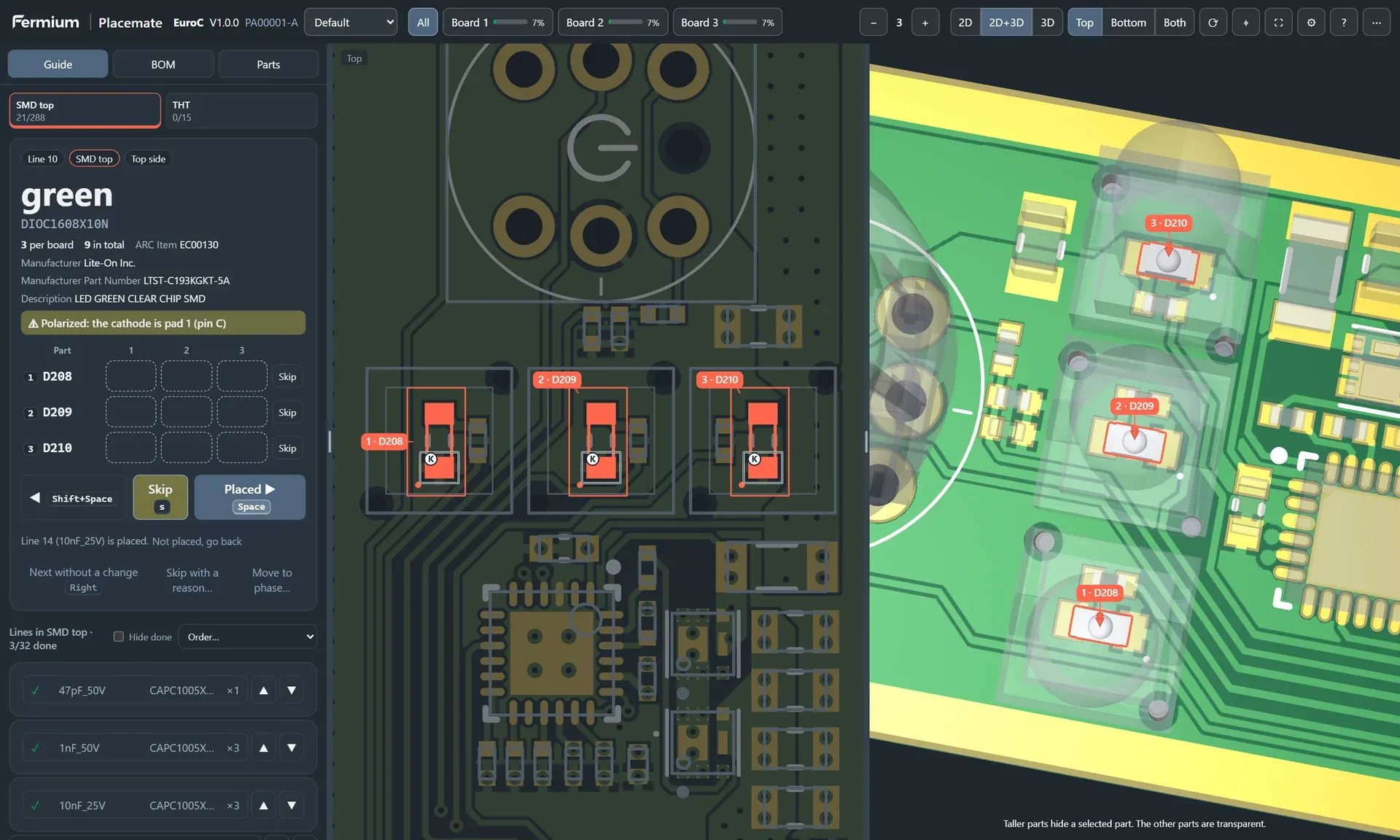
Placemate is a native extension for AD26 and Altium Develop. It reads the board through the Altium SDK and writes one offline HTML file with its own 2D and 3D renderer. Beyond an interactive BOM, it is a placement guide: it shows one BOM line at a time, highlights its parts on every board of the build, marks pin 1 and polarity, and goes to the next line when you press Space. It costs $25 per seat, once, and the licence includes all future versions.
| Option | Altium support | Offline file | 3D view | Guided placement |
|---|---|---|---|---|
| iBOM exporter script | Script in Altium | Yes | No | No |
| BoasTools | Extension | Yes | No | No |
| Altium 365 Assembly Assistant | Altium 365 | No | Yes | Done and skipped marks |
| Placemate | AD26, Altium Develop | Yes | Yes | Yes, 1 to 20 boards |
Make an interactive HTML BOM in Altium with Placemate
- Install Placemate. Close Altium, run the Setup program and select your Altium installations.
- Save the PCB document. Placemate reads the embedded 3D models from the saved file.
- Select Placemate » Generate… in the PCB editor. Select the variant, the build quantity and the output folder.
- Set the placement order, for example
C, R, L, F, D, Others, U, J, and select Generate. - Placemate writes
<PCBANumber>_<Version>_<Variant>.placemate.htmlintoProject Outputs for Placemateand opens it in the browser.
Copy the file to a tablet, send it to your assembly technician, or attach it to the release. To make the file in every release, add the Placemate Script Output to your OutJob.
What to look for in an interactive BOM for hand assembly
- Several boards at once. You usually build 3 to 10 prototypes. The tool must track each part on each board.
- Polarity. A diode on the wrong way costs more time than a slow tool. Look for cathode and pin 1 marks.
- Placement order. Small passives first, ICs later, connectors and THT parts last.
- Zoom to the parts. On a dense board, a highlight is not enough. The view must zoom to the parts.
- Progress that survives. Browsers delete local storage. Export the state or save it into the file.
- Offline. Bench PCs and tablets often have no network. The file must work without one.
Placemate does all of this. Try the live demo with our EuroC board, or read thecomparison with InteractiveHtmlBom.
Questions
Is Placemate an interactive HTML BOM (iBOM) for Altium?
Yes. Placemate gives Altium users what InteractiveHtmlBom gives KiCad users: a self-contained HTML page with a searchable BOM linked to the board drawing. Placemate adds a guided placement mode, a 3D view, polarity marks and progress for several boards.
How is Placemate different from InteractiveHtmlBom?
InteractiveHtmlBom is a free and excellent plugin for KiCad, EasyEDA, Eagle, Fusion 360 and Allegro, but it has no native Altium support. It shows a BOM table with checkboxes. Placemate reads Altium directly and guides you one BOM line at a time, with a 3D view, a build quantity of up to 20 boards, skip and undo, and a placement order. If you design in KiCad, use InteractiveHtmlBom.
Which Altium versions does Placemate support?
Placemate supports Altium Designer 26 (AD26) and Altium Develop on Windows 10 and Windows 11, 64-bit. The Setup program finds every Altium installation on the computer and installs the extension into the ones you select.
Does the HTML file need internet or upload my design?
No. The file contains the board, the BOM and the 3D meshes, and it makes no network requests. Your design stays on your computer and on the devices that you copy the file to.
Does the person who assembles the board need a licence?
No. The seat is for the person who makes the files in Altium. Anyone can open a Placemate HTML file in a current browser on a PC, a tablet or a phone, without an installation and without an account.