Altium Designer extension for AD26 and Altium Develop · New KiCad 10 pluginNew KiCad 10 plugin · Altium Designer extension for AD26 and Altium Develop
The interactive HTML BOM for Altium and KiCadKiCad and Altium, made for PCB assembly.
Placemate turns your Altium PCBKiCad board into one offline HTML file. It highlights every part of the current BOM line in 2D and 3D, marks pin 1 and polarity, and tracks each board you build. Place the parts, press Space, and the next line comes up.
- $25 per seat, once, for Altium and KiCad
- Trial with all features, no card
- Files open in any browser, offline
- Windows, macOS and Linux
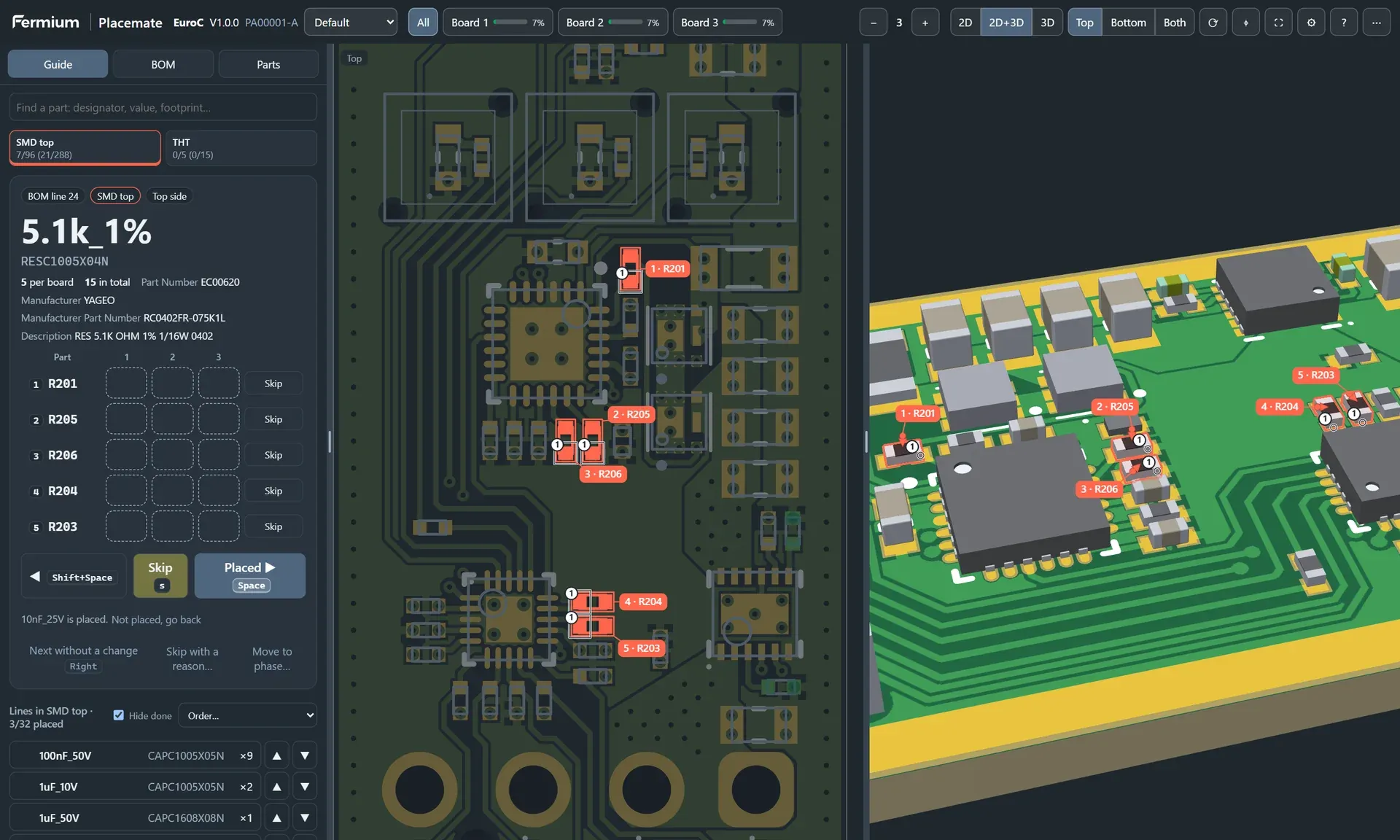
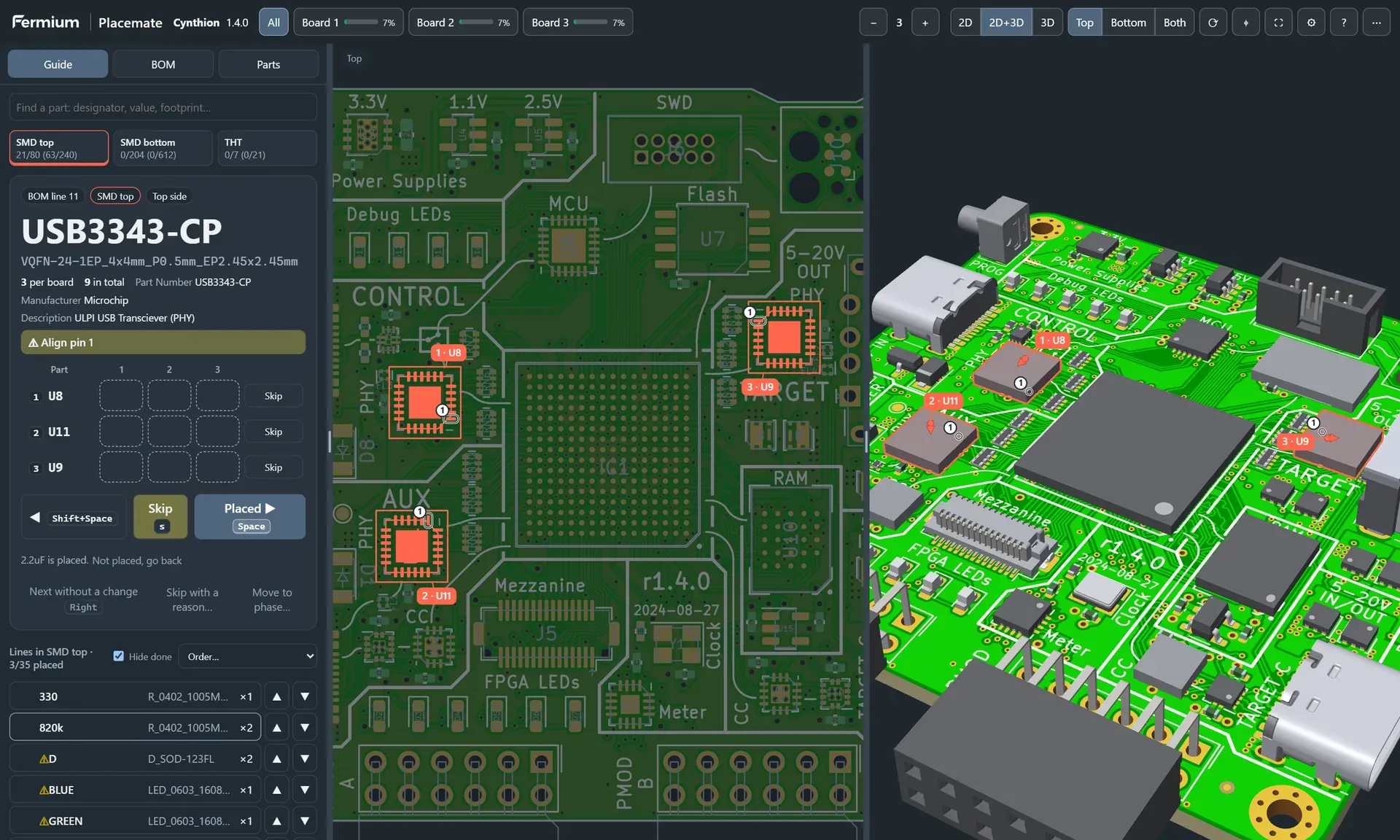
- 1 fileBoard, BOM and 3D models in one offline HTML file
- 1 keyPress Space when the parts are on, and the next line comes up
- 20 boardsBuild up to 20 boards at once, with progress per board
- 0 uploadsNo server, no account. The file makes no network requests
How it works
From AltiumKiCad to the bench in three steps
No export scripts, no BOM spreadsheets. One menu command in the PCB editor makes the file.
No export scripts, no BOM spreadsheets. One button in the PCB Editor makes the file, on Windows, macOS and Linux.
- 1
Generate in Altium
Select Placemate » Generate… in the PCB editor. Pick the variant, the number of boards and the placement order.
- 1
Click Placemate in KiCad
Click the Placemate button in the toolbar of the PCB Editor. Pick the variant, the number of boards and the placement order. Placemate reads the board straight from KiCad, including changes you have not saved.
- 2
Open it on any device
One self-contained file holds the board, the BOM and the 3D models, and it runs without an install, an account or a connection. Put it on the tablet next to your microscope.
- 3
Place, press Space, repeat
The guide shows one BOM line and highlights its parts on every board. Press Space when they are on,S to skip a line for later, U to undo.

See the guide work
No more hunting for C47 on the drawing
A static BOM makes you search the board for every designator. Placemate shows you where each part goes, on every board, in the order that you place them.
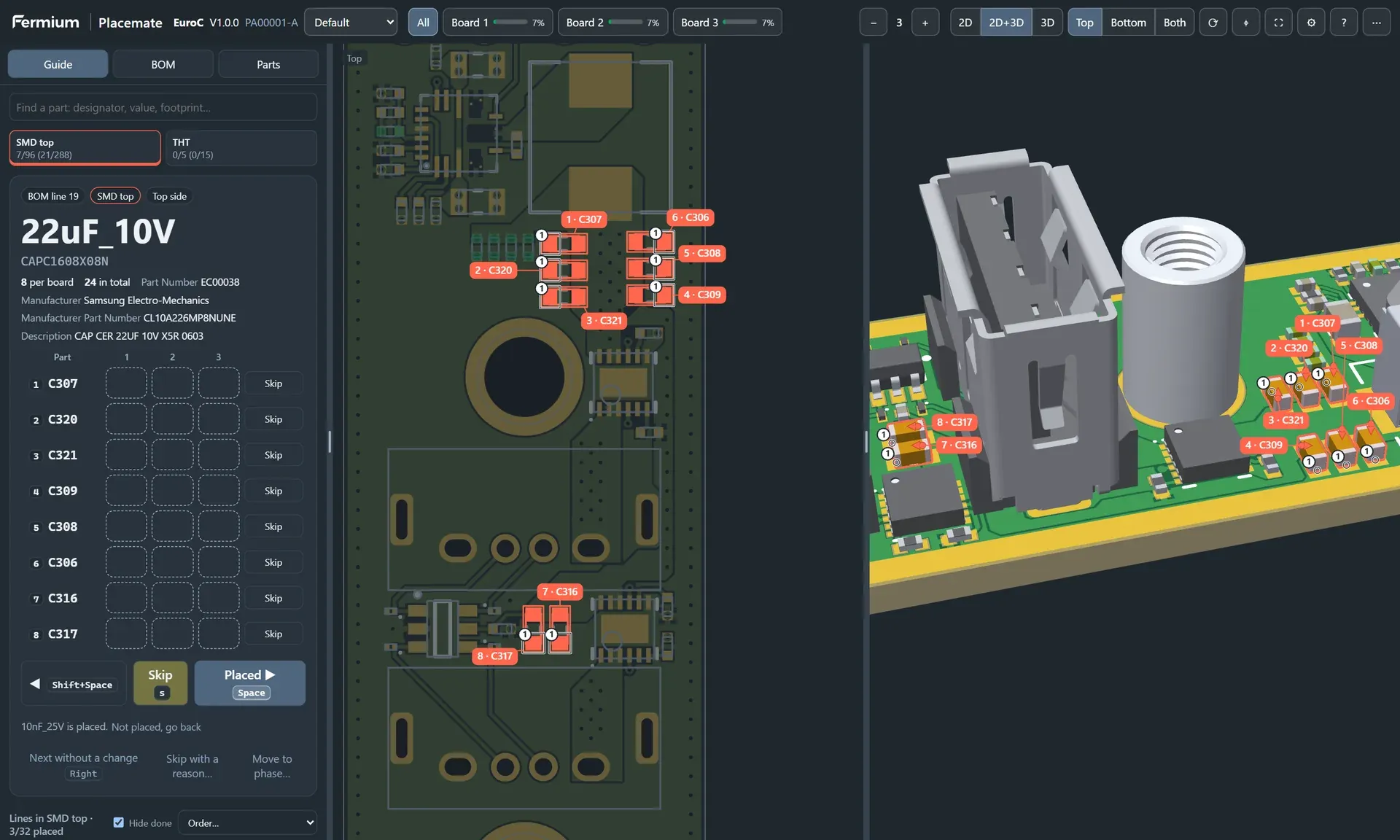
8 capacitors, 3 boards, one key
The guide shows the line 22uF_10V and highlights all 8 capacitors in 2D and 3D. Their numbers give the placing order: each next part is the closest one. A grid shows each part on each board. Press Space and the next open line comes up.
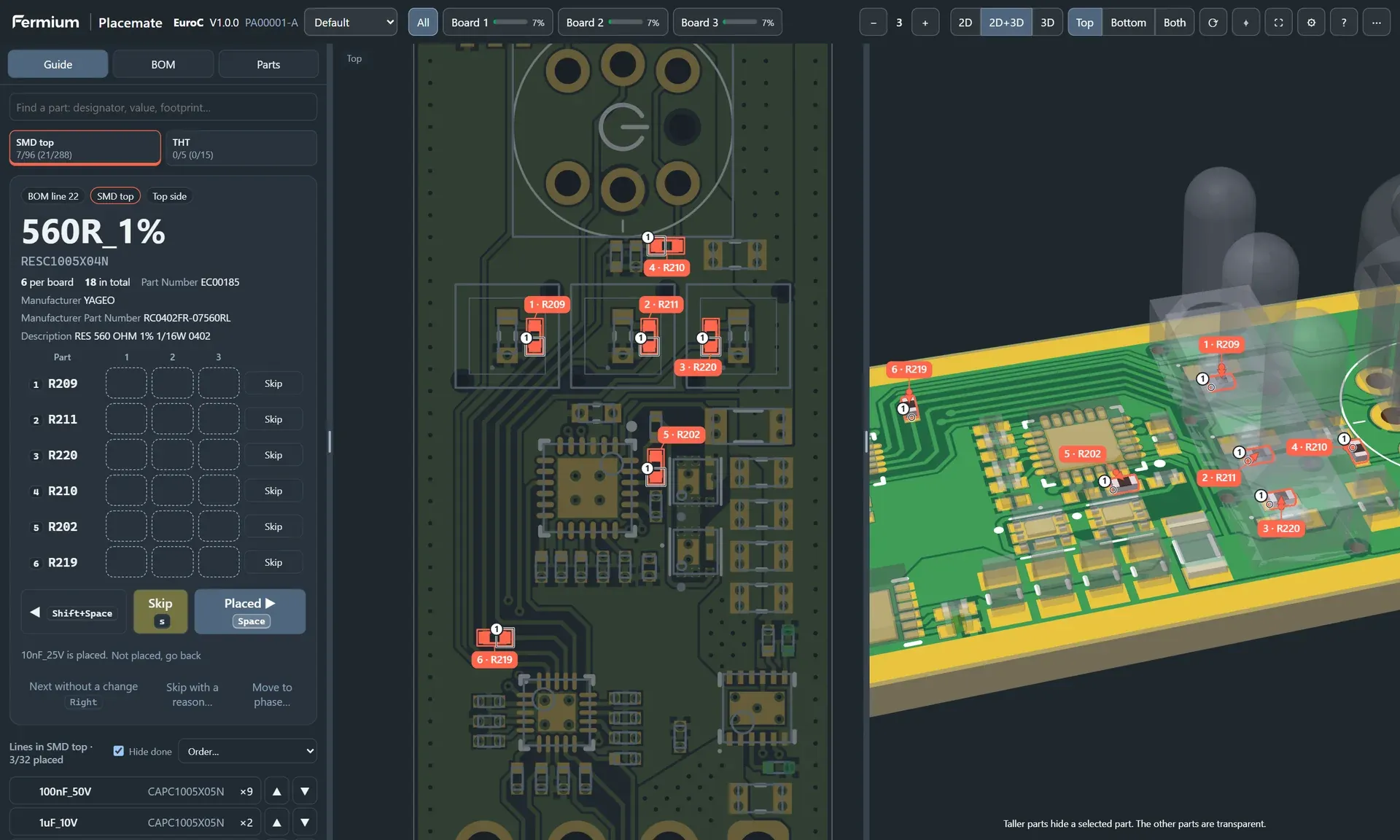
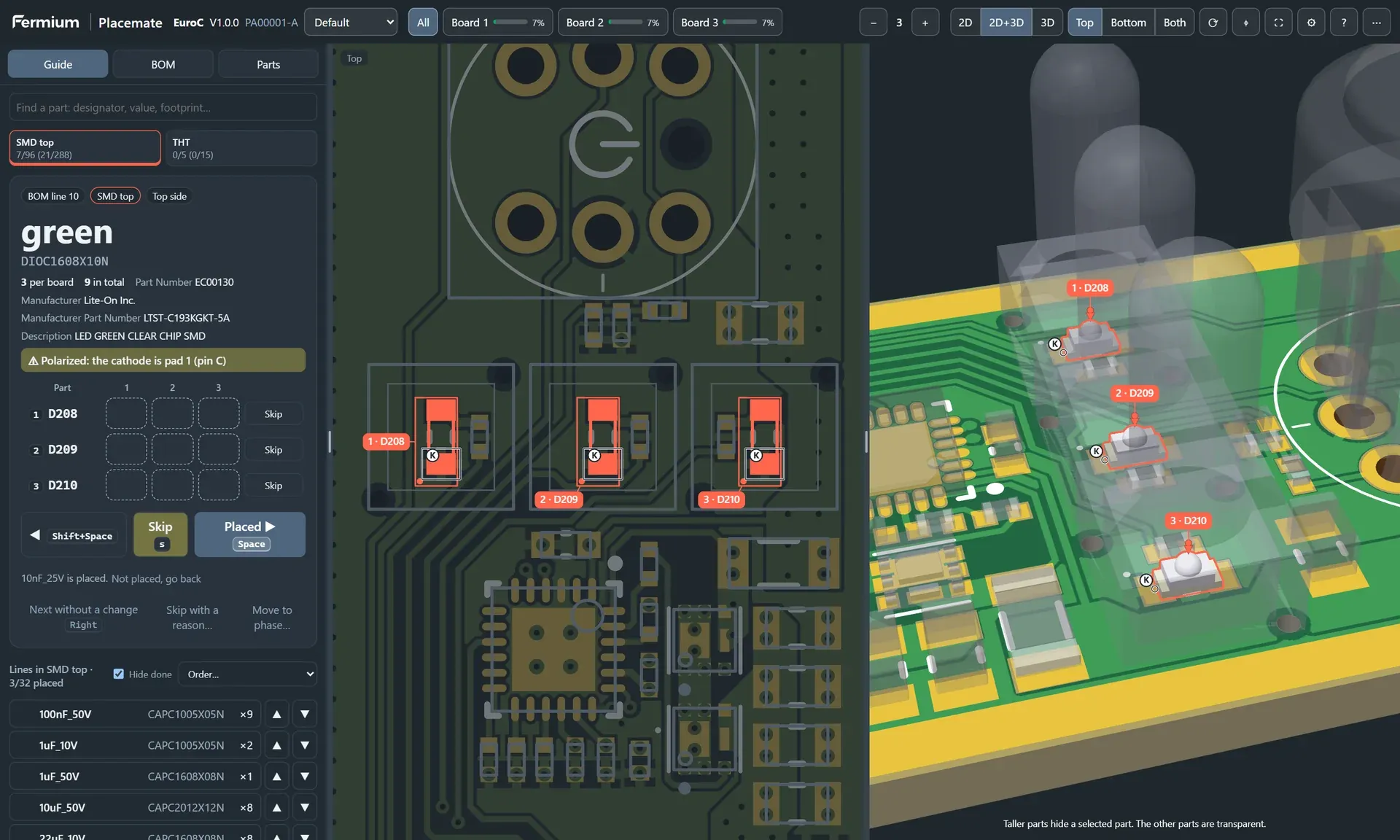
The cathode, marked on every LED
Placemate reads the pad names and the schematic pin names. It marks the cathode, the plus pad and pin 1, and spells it out: “the cathode is pad 1 (pin C)”.
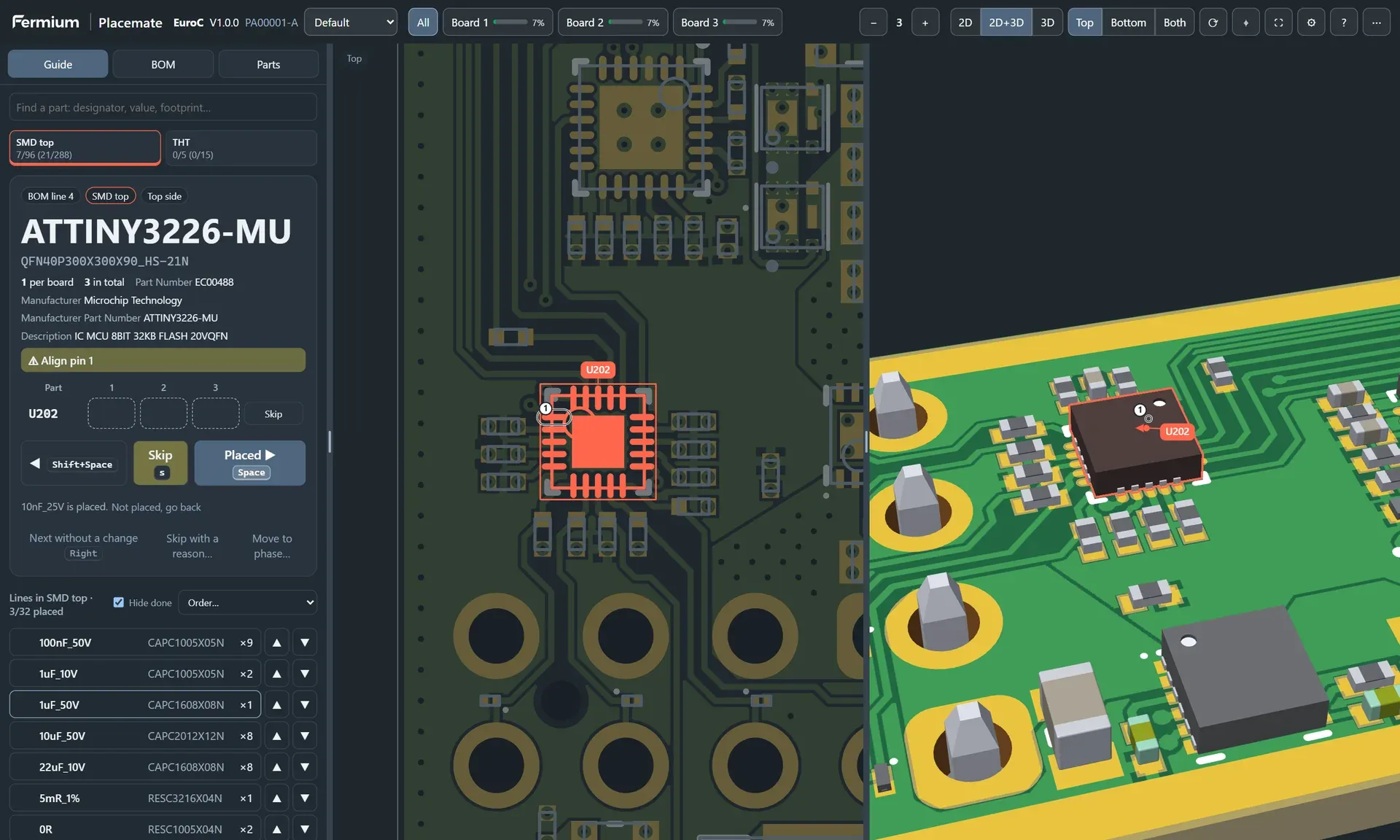
Pin 1 at a glance
The view zooms to the part and marks pin 1. The card spells it out, so you can check it before the part goes down.
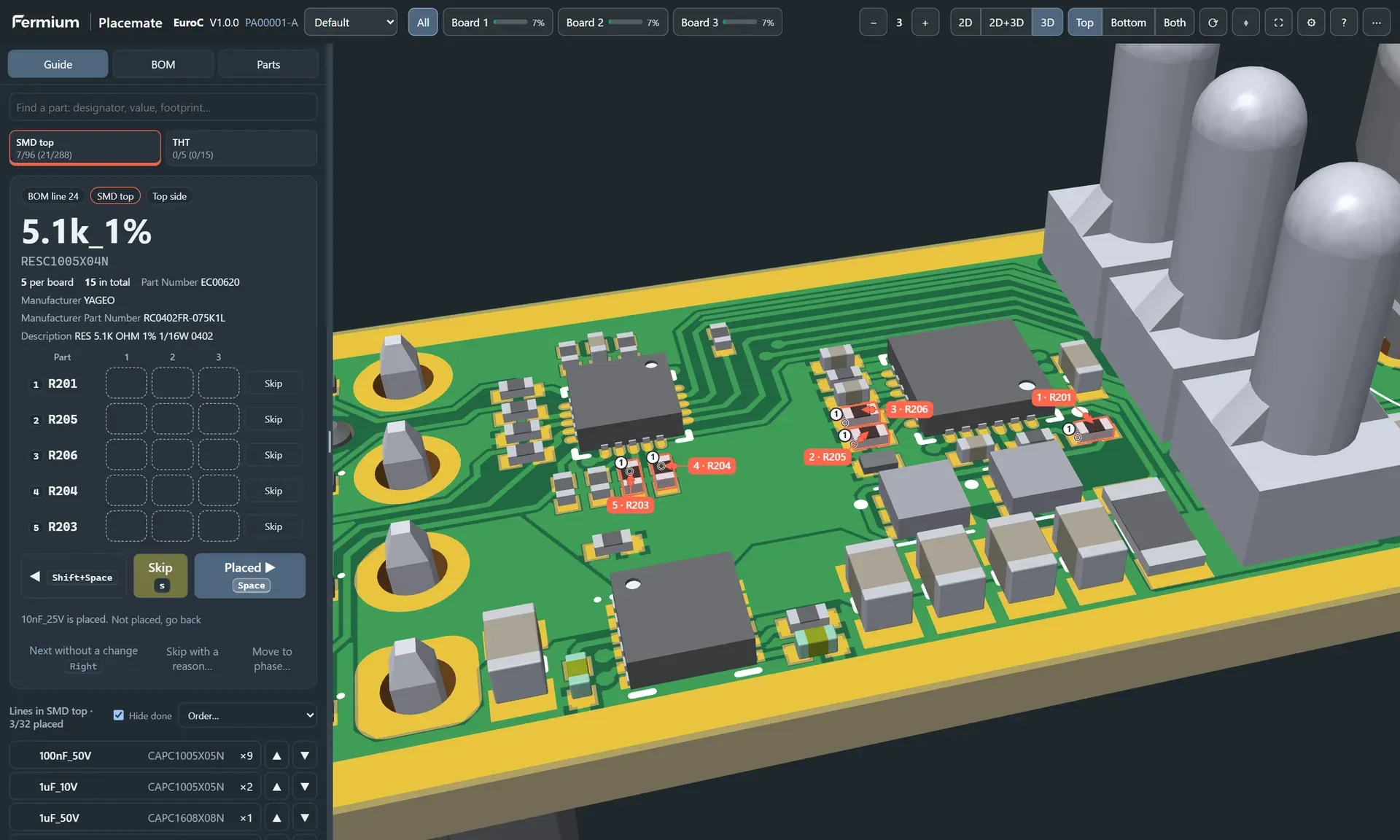
Your STEP models, in the browser
Placemate converts the STEP models from your Altium library or your KiCad footprints into compact meshes and embeds them in the file. Orbit, pan and zoom with mouse or touch.
Live demo
Try the real file in your browser
This is the Placemate file for our EuroC board, exactly as it came out of Altium. 104 parts, 36 BOM lines, 23 3D models, 3 boards in the build. Nothing to install.
This is the Placemate file for Cynthion, the open-source USB analyzer by Great Scott Gadgets, exactly as it came out of KiCad.348 parts (208 on the bottom), 63 BOM lines, 27 3D models, 3 boards in the build. Nothing to install.
- Space Done, next line
- S Skip for later
- U Undo
- 2 3 2D or 3D view
- Z Zoom to the parts
A Placemate file opens on a tablet next to the microscope. It works offline.
Demo board: Cynthion r1.4 by Great Scott Gadgets, CERN-OHL-P-2.0. Source: github.com/greatscottgadgets/cynthion-hardware. Great Scott Gadgets is not affiliated with Placemate.
Features
Everything a hand-assembled prototype needs
Built by hardware engineers who place 0402 parts under a microscope. Every feature saves you a look at the drawing or stops a part from going on the wrong way round.
Every part of the line, highlighted
The parts of the current line light up on the board, numbered so the next part is always the closest one. The view zooms in on them, and arrows point to any part that is off screen.
2D and 3D side by side
A sharp 2D drawing with copper, pads and silkscreen, and a WebGL 3D view with the STEP models from your library.
Pin 1 and polarity marks
Cathode, plus pad and pin 1 come from the pad and schematic pin names, never guessed from pad numbers.
Build 1 to 20 boards at once
Place a line on boards 1, 2 and 3, then move on. See the progress per board and in total, or work on one board at a time.
Skip for later, undo anything
Part not in stock? Press S. Skipped parts come back at the end. U undoes the last action, even one that covered all boards.
The placement order you want
Three phases: SMD top, SMD bottom, then THT. Sort each phase by prefix (C, R, L, D … U, J), by package size, ICs first or area by area.
Hands-free with a foot pedal
One key for each step. Map Space, S and U to a USB foot pedal and keep the tweezers in your hand.
Offline and private
The file makes no network requests, so there is no server, no account and no tracking. Your design stays on the devices you copy it to.
Progress that does not get lost
The browser keeps the build. Export it, or save a copy of the HTML file with the progress inside.
Variants, DNP and alternates
Pick the Altium variant in the dialog. Alternate parts show their own value, for example 4k75 1%.Pick the KiCad 10 design variant in the dialog. Do not populate and Exclude from BOM work as in KiCad.
Exact Altium geometryExact KiCad geometry
All pad shapes and TrueType text as polygons, the way the board looks in Altium, not a stroke-font copy.Placemate asks KiCad for the shapes of the pads and the text, so the board looks the way KiCad draws it.
Find any part in a second
Type a designator, a value or a footprint. Both views zoom to the part and the guide opens its line.
Compare
Placemate and the other interactive BOMs compared
InteractiveHtmlBom is a great free tool, but it does not read Altium files. BoasTools brought its viewer to Altium in 2021. Placemate is built from scratch for hand assembly.
InteractiveHtmlBom is the standard interactive BOM for KiCad: free, open source and very good. Placemate is the next step when you assemble prototypes by hand: it guides you through the build, across several boards, in 2D and 3D.
| Feature | Placematefor Altium | InteractiveHtmlBomiBOM, through an exporter script | BoasToolsiBOM viewer for Altium |
|---|---|---|---|
| Reads Altium Designer projects | AD26 and Altium Develop | Only through an exporter script | Altium extension |
| One offline HTML file | Yes | Yes | Yes |
| Guided placement, one BOM line at a time | Yes | BOM table with checkboxes | iBOM viewer |
| 3D view with your STEP models | Yes | No | No |
| Several boards in one build | 1 to 20, progress per board | Declined, issue #227 | No |
| Skip for later and undo | Yes | No | No |
| Placement order and phases (SMD, THT) | Yes | Requested, issue #246 | No |
| Zoom to the selected parts | Yes | Wishlist, issue #559 | No |
| Polarity marks: cathode, plus pad, pin 1 | From pad and pin names | Pin 1 | Pin 1 |
| Exact pads and TrueType text | Yes | Text as a stroke font | Rect, circle, oval; text as lines |
| Progress kept outside the browser | Export, or a copy of the file | localStorage only | Not tested |
Based on the public documentation and our tests with AD26 and Altium Develop in October 2026. The issue numbers refer toInteractiveHtmlBom on GitHub. Something out of date? Tell us and we will fix it.
| Feature | Placematefor KiCad 10 | InteractiveHtmlBomiBOM plugin for KiCad | KiCad itselfPCB Editor and 3D viewer at the bench |
|---|---|---|---|
| Price | $25 per seat, once | Free, MIT licence | Free, open source |
| Makes the file on | Windows, macOS, Linux | Windows, macOS, Linux | Windows, macOS, Linux |
| One offline HTML file for the bench | Opens in any browser | Opens in any browser | Needs KiCad and the project |
| Guided placement, one BOM line at a time | Yes | BOM table with checkboxes | No |
| 3D view with your STEP models | In the HTML file | No | In KiCad |
| Several boards in one build | 1 to 20, progress per board | Declined, issue #227 | No |
| Skip for later and undo | Yes | No | No |
| Placement order and phases (SMD, THT) | Yes | Requested, issue #246 | No |
| Zoom to the selected parts | Yes | Wishlist, issue #559 | Find one part at a time |
| Polarity marks: cathode, plus pad, pin 1 | From pad and pin names | Pin 1 | Pad numbers in the editor |
| Variants and do not populate | KiCad 10 variants and DNP | Variant and DNP fields | Yes |
| Progress kept outside the browser | Export, or a copy of the file | localStorage only | No progress |
Based on the public documentation and our tests with KiCad 10.0.8 in November 2026. The issue numbers refer toInteractiveHtmlBom on GitHub. Something out of date? Tell us and we will fix it.
Pricing
$25 per seat. Pay once, place forever.
A seat is yours for life, with every future version. No subscription and no account. Buy a seat for each engineer who makes Placemate files in Altium or KiCad.
Fermium Placematev0.8.2
$25USD per seat, once
lifetime licence
Total $25.00 USD, tax included
By selecting Buy now, you accept the terms of sale and licence.
Secure checkout by Stripe. Card, Apple Pay, Google Pay, Link, Amazon Pay or US bank debit. Every order gets an invoice with your company name and VAT number, even for a single seat.
- Company, 4 seats or more? Pay later by invoice
- 10 seats or more? Get a custom price
Included in every seat
- Lifetime licence with all future versions
- Altium extension for Altium Designer 26 (AD26) and Altium Develop
- KiCad plugin for KiCad 10.0 or newer on Windows, macOS and Linux
- Windows Setup for Altium and KiCad, and an install script for KiCad on macOS and Linux
- The placemate command-line tool for scripted builds and checks
- Unlimited boards, variants and HTML files
- HTML files that anyone can open without a seat
- E-mail support from the engineers who build it
Instant download. The link appears right after payment, and we also send it by e-mail.
Purchase order? Pay by invoice and enter the PO number. The invoice is due in 30 days.
No licence key or activation. The full version makes no network requests. Only the trial goes online, once on first start, to get its 30-day key.
Works without us. Your copy keeps running with the Altium and KiCad versions it supports, even if Fermium shuts down.
Trial over? Generate stops making new files, but the files you made keep working. The full version installs over the trial.
Pay by invoiceFor companies, from 4 seats. Payment online within 30 days, by card or a local payment method.
The invoice is on its way.
What is Placemate?
Placemate is an extension for Altium Designer and a plugin for KiCad 10 that turns a PCB project into one offline HTML file for hand-assembling prototype boards. The file shows the board in 2D and 3D, highlights all parts of the current BOM line, marks pin 1 and polarity, and tracks the progress of every board you build.
What is a good tool for an interactive HTML BOM in Altium?
For Altium Designer 26 and Altium Develop, use Placemate. It is a native Altium extension that makes one offline HTML file with the BOM, a 2D and a 3D board view, pin 1 and polarity marks, and the progress of 1 to 20 boards. One seat costs $25 once. Free options are the InteractiveHTMLBOM4Altium2 script and the BoasTools extension. Both write the board into the viewer of InteractiveHtmlBom, which shows a BOM table and a 2D view. InteractiveHtmlBom itself cannot read Altium files.
What is a good tool for an interactive HTML BOM in KiCad?
InteractiveHtmlBom is the free standard: a BOM table with checkboxes next to a 2D view of the board. For hand-assembling prototypes, Placemate adds a guide that shows one BOM line at a time, a 3D view with your STEP models, pin 1 and polarity marks, and the progress of 1 to 20 boards. Placemate needs KiCad 10 on Windows, macOS or Linux. One seat costs $25 once.
Is Placemate an interactive HTML BOM (iBOM) for Altium?
Yes. Placemate gives Altium users what InteractiveHtmlBom gives KiCad users: a self-contained HTML page with a searchable BOM linked to the board drawing. Placemate adds a guided placement mode, a 3D view, polarity marks and progress for several boards.
I use InteractiveHtmlBom in KiCad. Why pay for Placemate?
Keep InteractiveHtmlBom for a quick look at a board. Placemate is for assembling prototypes by hand: it shows one BOM line at a time and highlights its parts on every board of the build, zooms to them, shows them in 3D, marks the cathode, the plus pad and pin 1, and lets you skip a line and undo. You build 3 boards in one pass instead of building one board 3 times.
How is Placemate different from InteractiveHtmlBom?
InteractiveHtmlBom is a free and excellent plugin for KiCad, EasyEDA, Eagle, Fusion 360 and Allegro, but it reads no Altium files. It shows a BOM table with checkboxes next to a 2D view. Placemate reads Altium and KiCad 10 and guides you one BOM line at a time, with a 3D view, a build quantity of up to 20 boards, skip and undo, and a placement order.
I used BoasTools. Why switch to Placemate?
BoasTools exports Altium data into the iBOM viewer from 2021. Placemate has its own 2D and 3D viewer with the exact Altium pad shapes and text. It guides you one BOM line at a time on 1 to 20 boards and marks pin 1, the cathode and the plus pad. It is built for AD26 and Altium Develop.
Which Altium versions does Placemate support?
Placemate supports Altium Designer 26 (AD26) and Altium Develop on Windows 10 and Windows 11, 64-bit. The Setup program finds every Altium installation on the computer and installs the extension into the ones you select.
Does Placemate work with KiCad?
Yes, with KiCad 10.0 or newer on Windows, macOS (Apple silicon and Intel) and Linux (x64). The installer finds your KiCad installations and adds the Placemate button to the PCB Editor toolbar. Placemate does not read Eagle, EasyEDA or Fusion 360 files. For these, use the free InteractiveHtmlBom.
Does the KiCad plugin run on Linux or macOS?
Yes. The plugin runs on Windows, on macOS with Apple silicon or Intel, and on Linux (x64, including the KiCad Flatpak). On a Mac or a Linux PC, download the package for your system, close KiCad and run ./install.sh. It needs no administrator rights. It installs the plugin for each KiCad 10 version. The HTML file opens in any current browser on Windows, macOS, Linux, iPadOS and Android, so the person at the bench can use any computer or tablet.
Does the person who assembles the board need a licence?
No. The seat is for the person who makes the files in Altium or KiCad. Anyone can open a Placemate HTML file in a current browser on a PC, a tablet or a phone, with nothing to install and no account.
Does the HTML file need internet or upload my design?
No. The file contains the board, the BOM and the 3D meshes, and it makes no network requests. Your design stays on your computer and on the devices that you copy the file to.
Does Placemate need a licence key or an internet connection?
No. The full version has no licence key or activation and makes no network requests, so your copy keeps running with the Altium and KiCad versions it supports, even if Fermium shuts down. Only the trial contacts placemate.io, once on first start, to get its 30-day key.
What does "per seat" mean?
A seat is one user of Placemate. Buy one seat for each engineer who makes Placemate files. One seat covers the Altium extension and the KiCad plugin, costs $25 once and is valid for life.
Is Placemate a subscription?
No. You pay $25 per seat once, and the seat is yours for life. There is no subscription and no account.
Do I get new versions?
Yes, all of them. A seat is a lifetime licence for all versions of Placemate, including future ones. The link in your purchase e-mail always downloads the current version.
What do I get after the payment?
The confirmation page shows the download links right after the payment: the Windows Setup program and the KiCad packages for macOS and Linux. We also send the link to this page by e-mail. The Setup program installs the Altium extension, the KiCad plugin and the placemate command-line tool, for the design tools that you select. A KiCad package installs the plugin on a Mac or a Linux PC.
Can I get an invoice with our VAT number?
Yes, for every order, even for a single seat. Enter your company name and VAT number in the checkout. Stripe makes an invoice for the payment. If you do not get it by e-mail, write to contact@fermium.ch and we will send it to you.
Can our company pay by invoice?
Yes, from 4 seats. Fill in the invoice form on the pricing page, with a purchase order number if you need one. Stripe sends the invoice by e-mail. Pay it within 30 days on the invoice page of Stripe, by card or a local payment method. The download link comes by e-mail to the same address.
Is there a price for 10 seats or more?
Yes. For 10 seats or more we will quote you a custom price. Write to contact@fermium.ch with the number of seats.
Can I try Placemate before I buy it?
Yes, in two ways. The free 30-day trial installs the full Placemate into your Altium or KiCad, so you can generate files from your own boards. It needs no card and no account. The live demos on this site are real Placemate files: our EuroC board from Altium and the open-source Cynthion board from KiCad. They run in your browser.
What happens when the trial ends?
The Generate dialog shows the end date and a link to the pricing page, and stops making new files. The files that you made keep working: they are plain HTML files and need no licence. Buy a seat for $25 and install the full version. It replaces the trial, and new files no longer carry the Trial mark.
Does the trial need an internet connection?
Once. At the first use, Placemate asks placemate.io for a trial key for your computer and stores it. After that it works offline. A computer without an internet connection shows a small link in the Generate dialog: send us the code it shows, and we will e-mail you the key.
Which browsers can open the files?
Current versions of Chrome, Edge, Firefox and Safari on Windows, macOS, Linux, iPadOS and Android. The 3D view needs WebGL 2, which all of these browsers support.
Your next prototype, placed in one go
Generate the file in Altium, open it next to the microscope, and press Space. No more missed parts, and no more parts the wrong way round.Click Placemate in KiCad, open the file next to the microscope, and press Space. No more missed parts, and no more parts the wrong way round.