What is a good tool for an interactive HTML BOM in KiCad?
InteractiveHtmlBom is the free standard: a BOM table with checkboxes next to a 2D view of the board. For hand-assembling prototypes, Placemate adds a guide that shows one BOM line at a time, a 3D view with your STEP models, pin 1 and polarity marks, and the progress of 1 to 20 boards. Placemate needs KiCad 10 on Windows, macOS or Linux. One seat costs $25 once.
InteractiveHtmlBom: the standard
InteractiveHtmlBom (iBOM) by openscopeproject makes one self-contained HTML page from a KiCad board. The page links a searchable BOM table to a 2D drawing of the board, shows the silkscreen, the fab layer and the pads, and can highlight nets. You install it from KiCad's Plugin and Content Manager. It is free under the MIT licence, it runs on Windows, macOS and Linux, and it also reads EasyEDA, Eagle, Fusion 360 and Allegro files. For a quick look at a board, or for a single board, it is all you need.
Where a BOM table falls short in hand assembly
A prototype run is usually 3 to 10 boards on one bench. That is where a table with checkboxes gets slow:
- One board only. The checkboxes track one board. A request for several boards was declined (issue #227).
- No placement order. You cannot sort the lines into the order of the assembly (issue #246).
- No zoom to the parts. On a dense board you still search for the highlight (issue #559).
- No 3D view. Tall parts, connectors and parts under shields are hard to read in 2D.
- State only in localStorage. Clear the browser data and the progress is gone (#119).
KiCad itself at the bench
Some engineers put a laptop with KiCad next to the microscope. The PCB Editor finds a designator, and the 3D viewer shows the board with your STEP models. It works, but it needs KiCad and the project on the bench computer, it has no BOM order and no progress, and you find one part at a time.
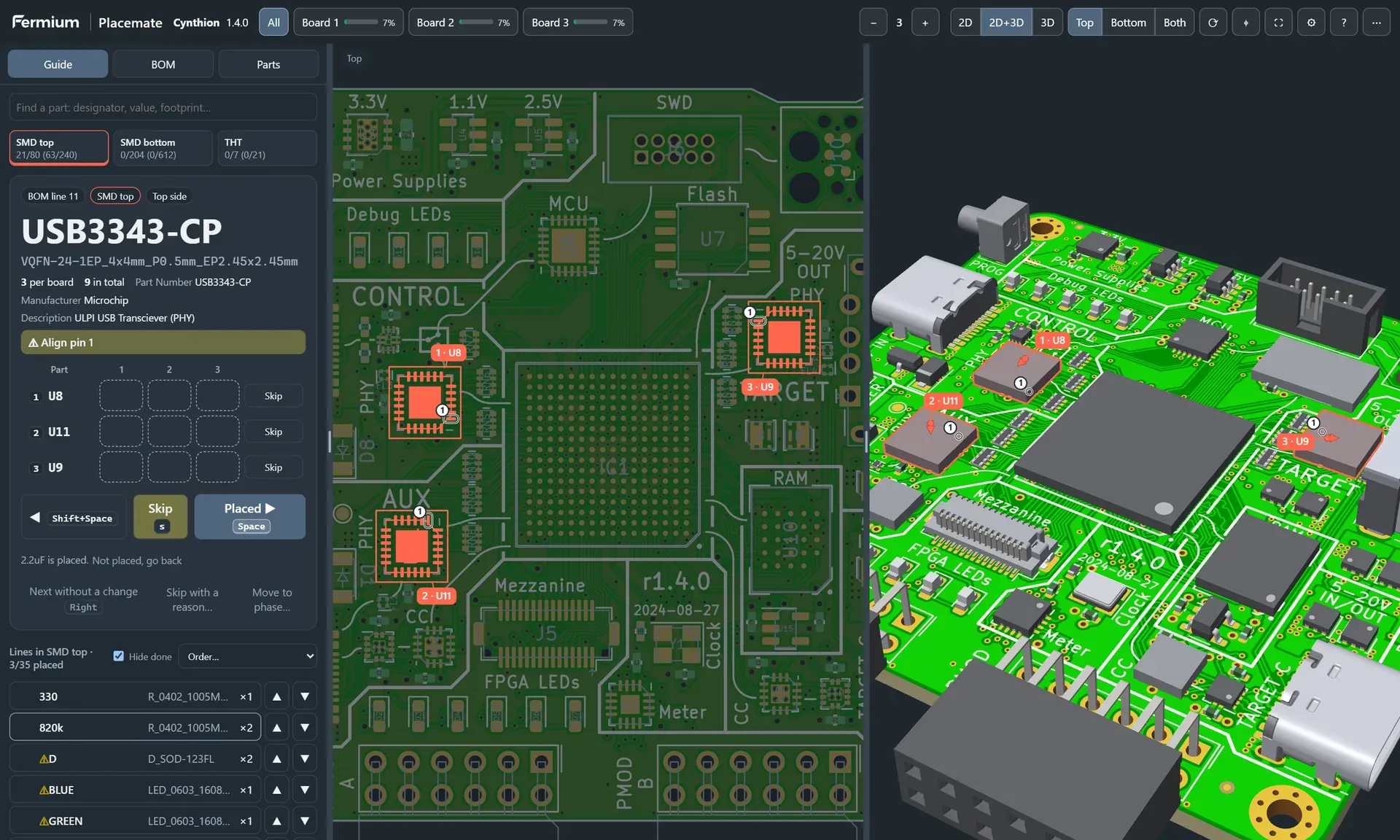
Placemate: a placement guide from KiCad
Placemate is a plugin for KiCad 10 on Windows, macOS and Linux. It reads the board from the running KiCad and writes one offline HTML file with its own 2D and 3D renderer. The file works as a placement guide: it shows one BOM line at a time, highlights its parts on every board of the build, zooms to them, marks pin 1, the cathode and the plus pad, and goes to the next line when you press Space. It costs $25 per seat, once, and the licence includes all future versions.
| Tool | Price | Runs on | Offline file | 3D view | Guided placement |
|---|---|---|---|---|---|
| InteractiveHtmlBom (iBOM) | Free, MIT | Windows, macOS, Linux | Yes | No | No, BOM table with checkboxes |
| KiCad at the bench | Free | Windows, macOS, Linux | No, needs KiCad | Yes, in KiCad | No |
| Placemate | $25 per seat, once | Windows, macOS, Linux | Yes | Yes | Yes, 1 to 20 boards |
Make an interactive HTML BOM in KiCad with Placemate
- Install Placemate. Close KiCad. On Windows, run the Setup program and select your KiCad 10. On macOS and Linux, extract the package for your system and run
./install.sh. - Open the board in KiCad's PCB Editor.
- Click Placemate in the top toolbar. Select the variant, the build quantity and the output folder.
- Set the placement order, for example
C, R, L, F, D, Others, U, J, and select Generate. - Placemate writes
<Title>_<Revision>_<Variant>.placemate.htmlintoProject Outputs for Placematenext to the project and opens it in the browser.
Placemate reads the footprint fields (for example Manufacturer and MPN), Do not populate,Exclude from BOM, the design variants of KiCad 10 and the schematic pin names for the polarity marks. It also reads changes that you did not save yet.
Who should use which
Use InteractiveHtmlBom for a quick look at a board, for a single board, or on Linux and macOS. It is free and very good at what it does.
Use Placemate when you place prototype boards by hand, several at a time, and want the guide, the 3D view and the polarity marks. Try it on Cynthion: the live demo is a real Placemate file of the open-source board by Great Scott Gadgets. Or install the free 30-day trial and generate the file from your own board.
Questions
I use InteractiveHtmlBom in KiCad. Why pay for Placemate?
Keep InteractiveHtmlBom for a quick look at a board. Placemate is for assembling prototypes by hand: it shows one BOM line at a time and highlights its parts on every board of the build, zooms to them, shows them in 3D, marks the cathode, the plus pad and pin 1, and lets you skip a line and undo. You build 3 boards in one pass instead of building one board 3 times.
Does the KiCad plugin run on Linux or macOS?
Yes. The plugin runs on Windows, on macOS with Apple silicon or Intel, and on Linux (x64, including the KiCad Flatpak). On a Mac or a Linux PC, download the package for your system, close KiCad and run ./install.sh. It needs no administrator rights. It installs the plugin for each KiCad 10 version. The HTML file opens in any current browser on Windows, macOS, Linux, iPadOS and Android, so the person at the bench can use any computer or tablet.
Which 3D models does Placemate use from KiCad?
The STEP models of your footprints, placed with the offset, the rotation and the scale of KiCad. The KiCad 10 library has STEP models only. For a footprint that names a VRML file, Placemate takes the STEP file with the same name, as KiCad 10 does. A footprint without a 3D model shows as a simple body.
Does the HTML file need internet or upload my design?
No. The file contains the board, the BOM and the 3D meshes, and it makes no network requests. Your design stays on your computer and on the devices that you copy the file to.
Does the person who assembles the board need a licence?
No. The seat is for the person who makes the files in Altium or KiCad. Anyone can open a Placemate HTML file in a current browser on a PC, a tablet or a phone, with nothing to install and no account.